Search This Blog

Saturday, 19 November 2011

HOW TO DOWNLOAD MOVIES FOR FREE ??? HERE ARE TOP TEN SITES FOR DOWNLOADING MOVIES ...

HOW TO DOWNLOAD MOVIES FOR FREE ??? HERE ARE TOP TEN SITES FOR DOWNLOADING MOVIES ...


Free, full length movies are abundant on the Web; that is, if you know where to look. Lots of websites promise free films, but I've sorted through it all to show you the top ten very best sites that will deliver great video right to your desktop.
1. Hulu
"free full length movies at hulu"
Hulu is the first place I go online when I want to find quality multimedia. They've got a good selection of movies here, and they are all easy to find with good organization.
Visit HuluRead Review
Sponsored Links

Christian Bible Lessons?Connect w/ People Having Similar Beliefs. See Our Books, Sermons.www.BJNewLife.org

Night Watch DvdAvailable on DVD with free shipping Specialists in cult, horror + noir.www.vicpine.co.uk

Movies of 2011Find 2011 Movies, Reviews, photos Win free Movie Tickets Nowwww.ahlanlive.com
2. Surf The Channel
"surf the channel free full length movies"
Surf The Channel has literally hundreds of movies; keep in mind that since all these movies are links to other sites, not all of the movies will work. However, out of five movies I randomly picked to test this site, all of them worked with no problems at all.
Visit Surf the ChannelRead Review
3. IMDB
"free full length movies at IMDB"
IMDB, also known as the Internet Movie Database, has added free full length movies and TV shows to its already large and informative site. As of this writing (August 2011), there were only about one hundred movies available; however, they are all hosted on the site and in good quality.
More about IMDBRead Review
4. Joost
"free full length movies at Joost"
Joost makes it very easy for you to view movies on the Web - just click to their film section and you're pretty much all set. Nicely organized by category and each movie is in very high quality.
Visit JoostRead Review
5. Babelgum
"free full length movies at babelgum"
Babelgum has plenty of great movies; however, you're going to have to do a little bit of sleuthing in order to find them. Your best bet? Go straight to the Channels page and look to the right - you'll see a whole list of really interesting subjects that you can then click on and find movies you might be interested in.
Visit BabelgumRead Review
6. Google Video
"free full length movies at google video"
Movies at Google Video can be found simply by going to the Advanced Search and changing the drop-down "Duration" menu to "longer than twenty minutes"; you can further refine your search parameters to find a particular movie you are interested in.
Visit Google VideoRead Review
7. Freetube
"free full length movies at freetube"
Freetube is quite different from the rest of the sites profiled in this list. Instead of individual movies, Freetube offers streaming channels from which you can watch a free full length movie: it's just not certain what you're going to get! Channels offered are The Movie Channel, Free Classics, the Mystery Channel, and quite a few more. All movies are in reasonably good quality; my only beef is that there should be some kind of viewing schedule available.
Visit FreetubeRead Review
8. OVGuide
"ovguide"
OVGuide is a multimedia search engine that scours the Web for high-quality videos, movies, TV shows, and films. OVGuide connects to more than 3000 movie and video sites, organizing content into an easy to use multimedia directory.
Visit OVGuideRead Review
Sponsored Links

Cheap Outdoor Theater KitAffordable Backyard Movie Screens Huge Discount on Inflatable Screenswww.OpenAirCinema.us

Latest Hollywood MoviesSee The Ratings of Latest Movies On Desimartini. Read and Write Reviewswww.Desimartini.com/HollywoodMovies
9. Public Domain Torrents
"free full length movies at public domain torrents"
Public Domain Torrents offers up nearly 1000 free, full-length movies that are completely free and legal to download to your computer; in other words, once you download them, they're all yours. These are all movies that have fallen out of copyright and therefore are now in the public domain. Each movie offers more than one way to download (many offer several options), so you're sure to find one that works for you.
Visit Public Domain TorrentsRead Review
10. Internet Archive: Moving Image Archive
"free full length movies at the internet archive"
The Internet Archive is a truly fascinating repository of all sorts of really high quality movies; you can find anything from historical films to open source movies here.

ABOUT NATURE

Friday, 18 November 2011

How to add feedburner Email subcription on blogger

You might have seen lots of blogs are using email subscription option to their readers. It can happen that your friend using feedburner email subscription widget to his/her blog, and you are looking for a help to add email subscription option to your blog.

 Here you will find about adding an email subscription widget to your blog from feed burner. These are easy steps to follow:
  • First of all and before anything, you'll need a FeedBurner account. To create an account, just click here. If you have already google account, that case it will be easier for you. Otherwise you can use other email address to open an account from FeedBurner.
  • If you are a new FeedBurner user, you'll need to burn your feed first. 
  •  Now you have burned a feed for your blog. Usually you'll not require to follow this step. It will automatically take you to Next step. But still if not, that case just click on your feed title, it will look like as below image.
  • Now click on your feed link above and then click on the publicize (Marked as 1) link from your feed burner dashboard.

  • Then Click Email Subcription (Marked as 2).
  • Select your language and Copy this code shown in below image.

  •  Now the Final Step. Go to your Blogger Dashboard>Design
  • Add a Custom HTML Holder and Paste these code. Save your template & done!
Feed burner lets you to add this widget directly to your blogger blog by following -
Below the HTML Code holder you will find a combo box. Click the drop down arrow and select Blogger. then press Go. It will go automatically to your blogger account and inserted this widget.

World's first 'cyber superweapon' attacks China

A computer virus dubbed the world's "first cyber superweapon" by experts and which may have been designed to attack Iran's nuclear facilities has found a new target - China.
The Stuxnet computer worm has wreaked havoc in China, infecting millions of computers around the country, state media reported this week.
Stuxnet is feared by experts around the globe as it can break into computers that control machinery at the heart of industry, allowing an attacker to assume control of critical systems like pumps, motors, alarms and valves.
It could, technically, make factory boilers explode, destroy gas pipelines or even cause a nuclear plant to malfunction.
The virus targets control systems made by German industrial giant Siemens commonly used to manage water supplies, oil rigs, power plants and other industrial facilities.
"This malware is specially designed to sabotage plants and damage industrial systems, instead of stealing personal data," an engineer surnamed Wang at antivirus service provider Rising International Software told the Global Times.
"Once Stuxnet successfully penetrates factory computers in China, those industries may collapse, which would damage China's national security," he added.
Another unnamed expert at Rising International said the attacks had so far infected more than six million individual accounts and nearly 1,000 corporate accounts around the country, the official Xinhua news agency reported.
The Stuxnet computer worm - a piece of malicious software (malware) which copies itself and sends itself on to other computers in a network - was first publicly identified in June.
It was found lurking on Siemens systems in India, Indonesia, Pakistan and elsewhere, but the heaviest infiltration appears to be in Iran, according to software security researchers.
A Beijing-based spokesman for Siemens declined to comment when contacted by AFP on Thursday.
Yu Xiaoqiu, an analyst with the China Information Technology Security Evaluation Centre, downplayed the malware threat.
"So far we don't see any severe damage done by the virus," Yu was quoted by the Global Times as saying.
"New viruses are common nowadays. Both personal Internet surfers and Chinese pillar companies don't need to worry about it at all. They should be alert but not too afraid of it."
A top US cybersecurity official said last week that the country was analysing the computer worm but did not know who was behind it or its purpose.
"One of our hardest jobs is attribution and intent," Sean McGurk, director of the National Cybersecurity and Communications Integration Center (NCCIC), told reporters in Washington.
"It's very difficult to say "This is what it was targeted to do,"" he said of Stuxnet, which some computer security experts have said may be intended to sabotage a nuclear facility in Iran.
A cyber superweapon is a term used by experts to describe a piece of malware designed specifically to hit computer networks that run industrial plants.
"The Stuxnet worm is a wake-up call to governments around the world," Derek Reveron, a cyber expert at the US Naval War School, was quoted as saying Thursday by the South China Morning Post.
"It is the first known worm to target industrial control systems."

How to Make a Torrent - Guides - µTorrent - a (very) tiny BitTorrent client

Sharing in BitTorrent is a little more involved than with other P2P applications. This is the result of the protocol that makes this distribution system so efficient. BitTorrent shares content by breaking it up in small pieces and distributing them randomly between peers. Those peers then share these pieces with each other. This saves the seed the trouble of sending the same pieces over and over to different peers and enables all the peers in a swarm to participate to the distribution of the files regardless of their percentage of completion.


In order for all those peers to know how to put all the pieces back in the right order and use the content, BitTorrent clients requires a special reference file called a Torrent. The torrent is what you download from the site and load into µTorrent. All the peers and seeds involved in the distribution of any given file have the matching torrent loaded into their client. In order to share your own content over the BitTorrent network you need to create a torrent for this content.


How to Make a Torrent - Guides - µTorrent - a (very) tiny BitTorrent client
Related Posts Widget for Blogger

New PCs could boot in seconds


Starting from next year, there’s a good chance that if you buy a new computer you’ll find that it boots up in only a matter of seconds in a long overdue out with the old and in with the new scenario.

I’m sure most would agree that ‘BIOS’ is now well and truly past its sell by date and UEFI, which has been designed to replace the archaic BIOS system in computers, and which stands for Unified Extensible Firmware Interface, is a much needed upgrade.

“Conventional Bios is up there with some of the physical pieces of the chip set that have been kicking around the PC since 1979” the BBC quotes Mark Doran, head of the UEFI Forum as having said. Doran is overseeing development of the UEFI technology.

According to Doran, the creators of the BIOS only expected it to last for about 250,000 devices.

“They are as amazed as anyone else that now it is still alive and well in a lot of systems” said Doran.

Doran also said that evolution of the BIOS when compared to other components has been “phenomenally slow”.

As BIOS was originally intended for the basic PC system, and we have advanced well beyond that with tablet computers and other smaller and more mobile devices being churned out daily, it really is time to bring BIOS up to date.

AMI is a company that produces BIOS software and Brian Richardson, who is part of AMI’s technical team, told the BBC that problems arise because BIOS expects a machine to have an internal setup similar to the first PCs.

UEFI of course, doesn’t, and Mr Doran said that the biggest and most obvious benefit for consumers is that we will see much faster boot up times. I’m sure we all would appreciate that.

“At the moment it can be 25-30 seconds of boot time before you see the first bit of OS sign-on” he said. “With UEFI we’re getting it under a handful of seconds.”

“In terms of boot speed we’re not at instant-on yet but it is already a lot better than conventional Bios can manage” and “we’re getting closer to that every day” says Doran.

When you think about it, it’s quite ridiculous that with all the advances in technology over the past few years it has still taken 3 decades to improve boot up times. Hurray for progress.

Metacreation : KPT Vector Effects 1.5 (Plugins for Illustrator)


KPT Vector Effects 1.5 is a fantastic plug-in. It adds so much more creativity to Illustrator that I have to contemplate how I ever lived without it before.

The interface is very simple and easy to follow, user friendly indeed. And if you are really uncertain how to use this veritable treasure chest of effects, it comes equipped with a PDF file. The plug-in program is otherwise very self-explanatory.

Download this Plugins for Free >>> MediaFire Link

The opportunities for variety are endless making this plug-in a valuable asset to any Illustrator/designer. The fun part about it is that once you discover an effect you like, you can then go and apply another effect on top of that. Some plug-ins for Illustrator won't let you do that. It certainly cuts down design time as well.


With 3D Emboss, once you have applied the emboss effect, you can delete the original artwork and maintain the emboss only. You can do this with Neon also. You're not locked into any set effect which is wonderful. Just about every effect is manipulative after applying it. Something else this program has which I was unable to capture are a variety set designs you can choose from.


Below I have given you some examples as well as the menu so that you can see some of the effects you can obtain using KPT Vector Effects. There's no way, of course, that I can show you everything, you'll just have to buy it to see all the awesome things it can do. If you go to MetaCreations site, you'll also be able to see more creative ways in which to use this plug-in.


These are extremely valuable plug-ins for Illustrator with infinite versatility. I highly recommend this program for any serious Illustrator user. As for myself, I prefer Illustrator as a drawing program over any others, and having these plug-ins just makes me that much more enthusiastic.

How to Remove Windows Genuine Advantage WGA

Windows Genuine Advantage is a software anti-piracy program started by Microsoft in 2005. It enforces the online validation of some of the Microsoft products. It is automatically installed if Windows Automatic Updates are enabled. If goes to the Windows Update site, it will ask you for installing this validation tool before you can select the updates from the Microsoft update website. By accepting to install this validation tool, anActiveX component in Internet Explorer is installed.

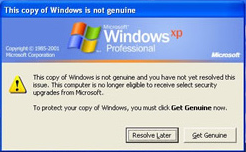
If, for some reason, this tool fails to validate your Windows, then it’ll always show you a warning that you may be a victim of software counterfeiting and that your Windows is not genuine. It will show up on your logon screen and make you wait for some seconds. And when you logon, it will just site in your status bar and will keep annoying you.
To Remove this tools from logon screen and also status bar Its need to Validate your windows or other hand Re-installing the Windows.

If you follow this steps writen below you may take away from this WGA. At first you need to disable Automatic Update under control pannel from your Windows. It would be best if you disable this option after installing windows then WGA doesn't touch you.

Let's start how we perform the step by step Windows Genuine Advantage removal plan that you can use immediately.

Also, if you really don't understand any of this step then don't worry, on the down site of this article I will place a link that will give you an uninstall WGA that works 100% and automatically.

Stey by Step procedure of Remove Windows Genuine Advantage Notification and logon screen waiting countdown.

Step-1 : Go to the Start Menu and click on Run.
Step-2 : On Run window, type system32 on Open text box and click OK. Windows System32 folder will open. On there go to Tools menu and then go to Folder Options and hit the View button.
Step-3 : Click on Check box beside "Hide extensions for known file types". (alternetly you can perform the uncheck task also.)
Step-4 : On System32 Folder find out the WgaLogon.dll (If you are a victim of this) and you have to rename it with any extension that system doesnot use as like as WgaLogon.sss. A warning may pops up for changing the extension, click on YES.
Step-5 : Now the time to find out the WgaTray.exe file and DELETE it! that's in the System32. When the file has been deleted, Press Ctrl+Alt+Delete button at a time and hit the "Processes" tab and highlight WgaTray.exe and click on "End Process".
Step-6 : Go back to System32 and delete the WgaLogon.dll application. Then you got to change the name back to the original name.

Is it very hard for your or you can not perform any of these steps no reason to worried about it. I will give you a small application that perform this task in a minute.
Click on the link below for Download this file
RemoveWGA | 13.5 kb | Mediafire Link

Windows Seven themes Create yourself

Every time we use Windows Defaults or third party theme pack download via internet. Only too much little people use their own theme on windows. Because there were no tools or options to create a theme in windows 98, 2000, ME, XP or vista. But now on Windows 7 break those all law of windows. Here you can create a theme and use it on your own pc and also share it with your friends and others. To create theme in Windows 7, there is no need any experience. I'll see you here how the procedure....


>> Suppose, You have a theme installed on your PC. Now Right click on desktop and go Personalize.
Starting for top left side. At first click on ‘Change Desktop Icons’.

>>Now click on these icon which you want to change and click change icon. Select your desire icon and click OK. If you not find any likeable Icon in your System then download from internet. There have a lots. Put tick mark on 'Allow themes to change desktop icons'. The press Apply and Ok.


>> Now the next option is change Mouse Pointer. Click on Scheme and select desire scheme. Here also you can use third party mouse pointer. Tick on Allow theme and hit apply and OK.

>> Now its time to Change your desktop wallpapers. Click on desktop background. Click browse and select your wallpaper folder where your all photos are. Change picture position on Fill. How long take to change a picture, select it from 'Change picture every' dropdown menu. You can click on Shuffle or not. Click on save change.


>> Now Play with color. Click on windows color. Adjust your own color and intensity. Here you will find 16 color by defaults. You can select your custom color from show color mixer and make you own color.

>> After that click on Advance appearance settings. Click on Item Drop box. Here you will find all text content of windows, change these as your own color and font. Click save. That’s all! What ever you want!.

>> Now click on Sound. Select your Choice able Sound from sound scheme and press OK. Here also you find your freedom. Click any events of program and select you sound from Browse Option. You can use any of sound files. There are more than 30 sound system facilities. But One condition, It must be {.wav} formatted file.

>> At last Option is Screensaver. Here you have freedom. Beside Windows screensaver you also use third-party screensaver. Just Select and Apply.

>> Now Its your final Step. Saving the theme. After performing all steps you can see your theme as an unsaved theme on My themes under personalize. Now click the theme and press Apply. Then right click on theme. Here come 2 options as "Save Theme" and "Save theme for Sharing". If you select first option your theme only work on your PC when your used file and photos location are unchanged. Or you can select second option with for sharing. It makes a different theme file including all Wallpaper, Sounds and settings you used. You can use these theme any other Windows 7 based PC by One click.

Related Posts Widget for Blogger

Registry Editor has been disable by Administrator


Some time we need to edit our system registry, but computer says on an error message "Registry editing has been disabled by your administrator." There is a simple way to enable it unless that PC is using Group Policy Editor.To do that follow these steps:

Click Start, Click Run and type gpedit.msc then press ENTER.


A window will open like this.

Go to the following branch:
User Configuration -> Administrative Templates -> System
Double-click on Prevent access to registry editing tools.

 Set it as Not Configured and it's done.

If it's already set as Not Configured, set it to Enabled and click Apply. Then repeat the steps and revert the setting back to Not Configured. This removes the registry based policy if set already.
So now you can do some research work on your PCs when under Registry Editing based.

Speed up your Windows XP that never happen before-2

OPTIMISE YOUR PAGEFILE
If you give your pagefile a fixed size it saves the operating system from needing to resize the page file.
1. Right click on My Computer and select Properties
2. Select the Advanced tab
3. Under Performance choose the Settings button
4. Select the Advanced tab again and under Virtual Memory select Change
5. Highlight the drive containing your page file and make the initial Size of the file the same as the Maximum Size of the file.
Windows XP sizes the page file to about 1.5X the amount of actual physical memory by default. While this is good for systems with smaller amounts of memory (under 512MB) it is unlikely that a typical XP desktop system will ever need 1.5 X 512MB or more of virtual memory. If you have less than 512MB of memory, leave the page file at its default size. If you have 512MB or more, change the ratio to 1:1 page file size to physical memory size.


REMOVE THE DESKTOP PICTURE
Your desktop background consumes a fair amount of memory and can slow the loading time of your system. Removing it will improve performance.
1. Right click on Desktop and select Properties
2. Select the Desktop tab
3. In the Background window select None
4. Click Ok

REMOVE FONTS FOR SPEED
Fonts, especially TrueType fonts, use quite a bit of system resources. For optimal performance, trim your fonts down to just those that you need to use on a daily basis and fonts that applications may require.
1. Open Control Panel
2. Open Fonts folder
3. Move fonts you don’t need to a temporary directory (e.g. C:\FONTBKUP?) just in case you need or want to bring a few of them back. The more fonts you uninstall, the more system resources you will gain.

DISABLE UNNECESSARY SERVICES
Because Windows XP has to be all things to all people it has many services running that take up system resources that you will never need. Below is a list of services that can be disabled on most machines:
Alerter
Clipbook
Computer Browser
Distributed Link Tracking Client
Fast User Switching
Help and Support – (If you use Windows Help and Support leave this enabled)
Human Interface Access Devices
Indexing Service
IPSEC Services
Messenger
Netmeeting Remote Desktop Sharing (disabled for extra security)
Portable Media Serial Number
Remote Desktop Help Session Manager (disabled for extra security)
Remote Procedure Call Locator
Remote Registry (disabled for extra security)
Remote Registry Service
Secondary Logon
Routing & Remote Access (disabled for extra security)
Server
SSDP Discovery Service – (Unplug n’ Pray will disable this)
Telnet
TCP/IP NetBIOS Helper
Upload Manager
Universal Plug and Play Device Host
Windows Time
Wireless Zero Configuration (Do not disable if you use a wireless network)
Workstation
To disable these services:
Go to Start and then Run and type “services.msc”
Doubleclick on the service you want to change
Change the startup type to ‘Disable”

TURN OFF SYSTEM RESTORE
System Restore can be a useful if your computer is having problems, however storing all the restore points can literally take up Gigabytes of space on your hard drive. To turn off System Restore:
Open Control Panel
Click on Performance and Maintenance
Click on System
Click on the System Restore tab
Tick ‘Turn off System Restore on All Drives’
Click ‘Ok’


SPEEDUP FOLDER ACCESS – DISABLE LAST ACCESS UPDATE
If you have a lot of folders and subdirectories on your computer, when you access a directory XP wastes a lot of time updating the time stamp showing the last access time for that directory and for ALL sub directories. To stop XP doing this you need to edit the registry. If you are uncomfortable doing this then please do not attempt.
Go to Start and then Run and type “regedit”
Click through the file system until you get to “HKEY_LOCAL_MACHINE\System\Cur rentControlSet\Control\FileSys tem”
Right-click in a blank area of the window on the right and select ‘DWORD Value’
Create a new DWORD Value called ‘NtfsDisableLastAccessUpdate’
Then Right click on the new value and select ‘Modify’
Change the Value Data to ’1'
Click ‘OK’

DISABLE SYSTEM SOUNDS
Surprisingly, the beeps that your computer makes for various system sounds can slow it down, particularly at startup and shut-down. To fix this turn off the system sounds:
Open Control Panel
Click Sounds and Audio Devices
Check Place volume icon in taskbar
Click Sounds Tab
Choose “No Sounds” for the Sound Scheme
Click “No”
Click “Apply”
Click “OK”

IMPROVE BOOT TIMES
A great new feature in Microsoft Windows XP is the ability to do a boot defragment. This places all boot files next to each other on the disk to allow for faster booting. By default this option in enables but on some builds it is not so below is how to turn it on.
Go to Start Menu and Click Run
Type in “Regedit” then click ok
Find “HKEY_LOCAL_MACHINE\SOFTWARE\M icrosoft\Dfrg\BootOpt imizeFunction”
Select “Enable” from the list on the right
Right on it and select “Modify”
Change the value to “Y to enable”
Reboot

IMPROVE SWAPFILE PERFORMANCE
If you have more than 256MB of RAM this tweak will considerably improve your performance. It basically makes sure that your PC uses every last drop of memory (faster than swap file) before it starts using the swap file.
Go to Start then Run
Type “msconfig.exe” then ok
Click on the System.ini tab
Expand the 386enh tab by clicking on the plus sign
Click on new then in the blank box type”ConservativeSwapfileUsage =1?
Click OK
Restart PC


MAKE YOUR MENUS LOAD FASTER
This is one of my favourite tweaks as it makes a huge difference to how fast your machine will ‘feel’. What this tweak does is remove the slight delay between clicking on a menu and XP displaying the menu.
Go to Start then Run
Type ‘Regedit’ then click ‘Ok’
Find “HKEY_CURRENT_USER\Control Panel\Desktop\”
Select “MenuShowDelay”
Right click and select “Modify’
Reduce the number to around “100?
This is the delay time before a menu is opened. You can set it to “0? but it can make windows really hard to use as menus will open if you just look at them – well move your mouse over them anyway. I tend to go for anywhere between 50-150 depending on my mood

IMPROVE XP SHUTDOWN SPEED
This tweak reduces the time XP waits before automatically closing any running programs when you give it the command to shutdown.
Go to Start then select Run
Type ‘Regedit’ and click ok
Find ‘HKEY_CURRENT_USER\Control Panel\Desktop\’
Select ‘WaitToKillAppTimeout’
Right click and select ‘Modify’
Change the value to ’1000'
Click ‘OK’
Now select ‘HungAppTimeout’
Right click and select ‘Modify’
Change the value to ’1000'
Click ‘OK’
Now find ‘HKEY_USERS\.DEFAULT\Control Panel\Desktop’
Select ‘WaitToKillAppTimeout’
Right click and select ‘Modify’
Change the value to ’1000'
Click ‘OK’
Now find ‘HKEY_LOCAL_MACHINE\System\Cur rentControlSet\Control\’
Select ‘WaitToKillServiceTimeout’
Right click and select ‘Modify’
Change the value to ’1000'
Click ‘OK’

Speed up your Windows XP that never happen before

Pursue Some tricks we can make our Windows more faster that never happen before and usually these all are unnecessary for each time. Some features are usually for only looking attractive.

Optimizing Display Settings
Windows XP mostly like for its visual interface. We do not interfere that but on this visualization has more extra feature that does not need ever without wasting system resource. Lets see how we can disable it-
1. Go to Start Menu
2. Click Setting.
3. Click Control Panel
4. Click System.
5. Go Advance Tab
6. Click Setting under Performance group
7. Off only the following ticked
 * Show Shadows under Menu
 * Show Shadows under Mouse Pointer.
 * Show Translucent Selection Rectangle
 * Use drop shadows for icons labels on desktop.
 * Use visual style on windows and buttons


Disable Indexing services
Indexing service is a small program that uses a large amount of RAM and Often it makes computer totally endless slow. This services process all of your file that have on your computer listed in and put them an index. When your search something on computer, it will easy for system to find that file from scanning this index list. But its no more time to take for search without indexing. So its an unnecessary service for Windows XP. Lets see how it can be disable...
1. Go Start
2. Click Setting
3. Click Control Panel
4. Double Click Add/Remove Programs
5. Click Add/Remove windows components.
6. Uncheck the indexing services.
7. Click Next and Enjoy.

Speed up Folder Browsing
We may noticed that every time when we open my computer, it will take few minutes. This is because windows XP search network files and printers every time. It's unnecessary. To fix this and browsing computer folder smoothly to take the following
1. Open My Computer.
2. Click Tools Menu
3. Click Folder Options
4. Click on the view tab
5. Uncheck the Automatically search Network Folders and printers check box
6. Click Apply & Ok
7. Reboot your computer.

How to Install Windows XP More Faster

This is a simple tricks to Installing Windows XP in 10-15 Minutes. It will very helpful those who frequently install windows XP. Generally we see that XP Installation takes more than 39 Minutes and its' goes absolutely true when your computer RAMs are minimum. These simple steps are for those type of user who watns to reduce the OS XP Installation time.
Now I'll teach you these simple steps :
1. Insert an XP Bootable CD/DVD on your ROM
2. Reboot your system. It's will automatic ask to boot from CD/DVD ROM. Press any key.
3. Format your destination drive and setup will automatically loaded all necessary file.
4. As soon as the 256 Color part is complete and gone away you will enter the Graphical User Interface (GUI) area as like as below screen.
5. Now Press SHIFT + F10 key together. Command promt will appear.
6. Type 'taskmgr' (without qoutation) and hit Enter Button. Now You can see like below Image.
7. Click the processes Tab and Select "Setup.exe". Right Click on Setup.exe and set priority "High". Initially It will be "Normal"

Now the tricks are complete and see how long time will take to Installation Windows XP
Related Posts Widget for Blogger

Solve Windows XP Restart Problems

The root of a Windows XP shutdown problem can be traced to several issues. Windows as an operating system has been stable at best but is known to have many problems within its shell. One of the possible problems that can occur is a damaged exit sound file. If your Windows was recently installed or there was a problem in the install process, then there might be a hiccup in the shutdown process.

Some technicians actually have identified the problem as starting from either a problem with hardware devices or the problem with a recent hardware install. When you try to troubleshoot the problem of Windows shutdown, make sure you have initial fail safes that Windows has installed turned off. A good way to troubleshoot this problem would be to log onto Windows in ‘safe’ mode and see if there are any hardware device driver conflicts that you can resolve. Sometimes, bad command lines or orphan keys in the registry can cause Windows to lock and restart itself, or even hang. So you see, resolving a windows XP shutdown problem is not at all that difficult. If you have a basic understanding on how to use your computer and how it operates, you should be able to resolve a Windows XP shutdown problem without having to engage the services of a professional computer technician.


Find three tips here to fix common Windows Xp Startup Problems with a few of easy steps. 1.Use Windows Startup Disk to fix Windows Xp Startup Problems.

If the startup problem is caused by the broken booting record of activity partition or damaged files for starting operating system, a startup disk would solve this problem easily:

A.To create a Windows XP boot disk. 1. Place diskette into the computer. 2. Open My Computer, right-click the A: drive and click Format. 3. In the Format window, check Create an MS-DOS startup disk. B. Use this boot disk to start Windows System Once the bootable diskette has been successfully created, following the below steps you will be able to boot from the diskette.

3.As the computer is booting, answer the questions prompted. 5.Restart your computer one more time.

2.Use Last Known Good Configuration to fix Windows Xp Startup Problems.

Using Last Known Good Configuration to boot operating system is also a usual method to get into the Windows Xp. Last Known Good Configuration is a Windows startup option which uses the most recent system settings that worked properly. Every time you turn your computer off and Windows shuts down successfully, important system settings will be saved in the registry automatically. Press Ctrl+Alt+Delete to restart your computer. When you see the words: “Please select the operating system to start” appears on the screen or hear a short beep from computer, press and hold the F8 key before the Windows logo appears. 3.Use System Restore to fix Windows Xp Startup Problems.

Another tool which can help you start Windows system is “system restore” function. As a service running on the backstage, System Restore helps PC users recover system files, registry keys, installed programs, etc. to a previous state in the event of malfunctioning or failure and meanwhile monitors any changes of important system components persistently. Press Ctrl+Alt+Delete to restart your computer at first. Then on the Advanced Boot Options screen, use the arrow keys to select “Safe Mode”. Press “start” button after entering the “safe mode” to choose All Programs, Accessories, System Tools Menu and then click System Restore. Click “Next” to select a restore point then start system restore mission.

Furthermore, we’d better take some preventive measures to backup registry of system with some registry tools in order to restore the important registry in the event of Windows Startup Problems being occurred.
Login
Follow the discussion
Comments
There are no comments posted yet. Be the first one!
Post a new comment

Enter text right here!

Comment as a Guest, or login:

Login to IntenseDebate
Login to WordPress.com
Login to Twitter
facebook
Login to OpenID

Name
Email

Displayed next to your comments.

Not displayed publicly.
Submit Comment
Subscribe to
Related Posts Widget for Blogger

Monetize your site without Google Adsense-2

google.html">If you interested please see : Part 1

Bidvertiser (http://www.bidvertiser.com/)
Like AdSense, Bidvertiser displays text ads in your page. But the difference lies in the fact that advertisers bid over your advertising space, ensuring you earn as much revenue as you possibly can. This also means that bids will increase over time, earning you even more cash. You also get a great way to customize your ads with a very easy to use tool and detailed reports on your site's status.

Quigo AdSonar (http://www.quigo.com/adsonarpublishers.htm)
Quigo AdSonar achieves relevancy by placing a filter according to your site's categories. It also offers you on-line reports of your site's status and the possibility to add your own custom ads replacing ads that don't gain you any revenue. The setup is very simple, in a similar fashion to AdSense's and quite customizable as well.

Vibrant Media IntelliTXT (http://www.intellitxt.com/site/web_01a.html)
Vibrant Media IntelliTXT offers user-activated ads, highlighting certain words within the content of the page and presenting relevant ads when a user hovers his mouse over them. It uses a pay-for-performance pricing scheme and can easily be used along with other advertising methods, because it is unobtrusive. It places you in full control, allowing you to easily integrate it within your site with some simple JavaScript.


Nixie (http://www.nixxie.com/display.php?section=Partners)
Nixie claims to hold a technology that can read and understand your site, enabling it to display the most relevant content to your site. Besides text ads, Nixie also features price comparison listings as well as live auction advertising. It's very easy to implement and has a good payment policy as well.

MIVA AdRevenue Xpress (http://www.miva.com/us/content/partners/arx.asp)
MIVA AdRevenue Xpress is targeted towards small and mid-sized publishers. It implements Search Box functionality and also features things like a Category Directory as well as the handling of 404 error pages. It can be integrated with your page using a simple on-line wizard.

Fastclick (http://www.fastclick.com/publish.html)
Fastclick offers you an impressive 65 percent of what it makes from a click on your website. Payments are done monthly, via PayPal or through checks. The ads can be formatted as you wish, and Fastclick even offers a free support serice for its members and no fees are required to register with the service.

contextWeb ContextAd (http://www.contextweb.com/Corporate/publisher/publisher.shtml)
ContextAd offers the possibility of contextual ads for dynamic pages, meaning ads will change as soon as your page does. It's very easy to use and free to sing up for and offers a transparent payment policy. The ads are fully customizable and real-time reports are available 24/7.

AdBrite (http://www.adbrite.com/)
AdBrite offers publishers the possibility of integrating text ads in their pages. These are done on your own rates, with the websites you approve by hand so it bares some similarities with a classic advertising scheme. You also have the option of adding a "Your Add Here" button that buyers can immediately click to ad space on your page. It can also be used in conjunction with Google AdSense, maximizing your CTR and offering advertisers the possibility of showing their links in your Google AdSense space. You have full control over the look and feel of your adds and finally, you get an incredible 75% of what the advertiser pays for on every click.

So, as you can see there are many offers for this kind of advertising, and many hybrids based on AdSense like advertising. Also, a lot of services can work together with AdSense to earn you an even greater amount of revenue for your ad space.

Monetize your site without Google AdSense

Many people in the web affiliate market want to start via Google's AdSense program, but few of them find that goal of chance to join Google AdSense. It's also very difficult to reached google affiliate market and also its need unique contents and supported language. Page navigation system also a factor for Google AdSense.
I've thanked those people who have reached the goal of AdSense. But maximum people trying to find that more and more and the result comes the account banned.
I would try to find some way to alternate for Google AdSense that's are mostly like as Google AdSense & flexible to use.

AllFeeds (http://www.allfeeds.com/?action=publishers)
AllFeeds is one of the great media for online advertisers & publishers. Most announce feature of AllFeeds is AdSense Integration. AllFeeds also featuring many size and formats to display ads that you can choose from. Banners, buttons, XML feeds, DHTML pop-ups and many more category ads found there. It also have real time reporting of your ads. When your earn will reaches $25.00 the site mail you a check.
MarketBanker (http://www.marketbanker.com/mb/sell.php)
MarketBanker allows you the unique possiblity to set the pricing for your site. It also allows you to allow or reject any link that appears on your site (although AdSense itself does a very good job of this as well, with URL filters) There's also a statistics section which will allow you to see how well your site is doing. The ads are small just like AdSense's and they're just as easy to set up. Also, registration for MarketBanker is free.

BidClix (http://www.bidclix.com/PubTop.html)
BidClix is different because it has advertisers compete for clicks on your site, which in turn is meant to generate the highest possible profits for your page. It also has a very large pool of advertisers which ensure there are plenty of people to choose your site. However, it does require more polish on site contents then AdSense. As most sites, real time statistics are available and its very easy to get started with this service, but it's also very flexible.

Chitika (http://www.realcontext.com/index.php?option=RealContext:+Contextual+Targeting+Engine)
RealContext uses Artificial intelligence to retrieve the most relevant ads for your page. And there's an extra feature which makes RealContext unique as well. Keywords are selected based upon which previous selections payed off and which didn't. That means there's a constant feedback process that ensures you gain better revenue from your ads. It also supports blocking certain adds and child-safe filtering and many more options.

AdHearus (http://adhearus.com/webmaster.php)
AdHearus is a very feature-packed contextual ad provider. As with AdSense, advertisements are targeted but it doesn't stop here at all. The ads are very flexible, you can select from text-ads, banners, rectangles, pop-ups, pop-unders or skyscrapers. You can also display your own ads, through rotation, both on your site and on other affiliate sites, which makes AdHearus a hybrid with conventional advertising technologies. There's a very comprehensive on-line real time reporting feature and, as usual with such services, starting out is free and it's a breeze.

AffiliateSensor (http://www.affiliatesensor.com/)
AffiliateSensor has highly customizable ad blocks, which you can make for yourself with an easy to use on-line interface. You also get realtime reporting with clicks-by-domain, page and refferer. There's integration with Google AdSense as well, through the google_alternate_ad_url so AffiliateSensor can be used as a substitute for Google PSA's (Public Service Ads).

Kanoodle Bright Ads (http://www.kanoodle.com/about/brightads.cool)
Kanoodle's offering allows publishers to get ads related to topics or segments, and not the traditional keyword oriented ads. The site also groups publisher sites with advertisers by hand to ensure high-revenue generating ads. And speaking of revenue, the amount of money you receive is a clear 50% share of the amount of money Kanoodle recieves for an advertiser.

TargetPoint (http://publisher.targetpoint.com)
TargetPoint is oriented more towards content publishers. It offers full control over the look the ads, statistics over your site's overall performance and better revenue. It's free to register and you earn a guaranteed 60% of the total revenue. You can get payed with Paypal of Bank checks and (most times) wire transfers as well.

Clicksor (http://www.clicksor.com)
Clicksor will earn you as much as 60% from the amount of money your website produces. What you get is about the same as AdSense, there are targeted text ads, you can view the revenues from your website in real time. You can receive money via PayPal or through a check every two weeks, provided that you have earned more then $50. If you haven't made that much, your earning roll over to the next period

Create your fan page on Google+


Google+ fan page is like as Facebook fan page. Google plus gives you this opportunity to create a fan page for your web site, product, hotel, restaurant, local business, products or brands, company, music or TV.
You can create a Fan page for your customer, follower or fans for hangout to your branding.

Click Here for creating a Google+ page


For Creating a Page you need to perform few step action. It's very easy.
Click on Google+ page tab on the right site panel marked as red box indicated Arrow. You will see as like as below image.

Click any of these category by your choice and your capability. Here are some options-
1. Local Business or Place : Hotels, restaurants, places, stores, services etc.
(a) For this category set your location and Phone Number (mandatory).
(b) Don't worried about phone match or don't match, click set location.
(c) Set all option at your needed.
2. Product or Brand : Apparel, Cars, Electronics, Financial Services etc. Sub-categories available.
3. Company, Institute, Organization : All about company, organization, Institute or Non-Profited Organization etc. There have sub-categories also.
4. Arts, Entertainment or Sports : All about Arts, Movies, Songs, Sports etc. It has sub-categories.
5. Others : If your page doesn't suite any of above, Select this category.

At last set your page title, web address, sub-category and user access level. By accepting google plus TOS click CREATE and you are Done!